Data under control
Studio runs on a local PC in your lab, images and models never leave your machine. No internet access is required, making it fully compatible with air-gapped environments.

AI image segmentation for microscopy
Clemex Studio is an intuitive platform for training image segmentation models. Specialized for microscopy. Designed for domain experts, no AI experience required, no coding needed. Built with AI from the ground up.
Still on manual counting, intercept, or point counting because detection never held up? Clemex Studio lets you build and validate that detection step yourself on hard microscopy images. No need to call the data-science team.
Select a capability to see it in action.
Mark features on a few representative images, train a model in minutes and then iterate until you are ready to validate on out-of-distribution images to sign off. No code, no IT project, no waiting for data scientists.
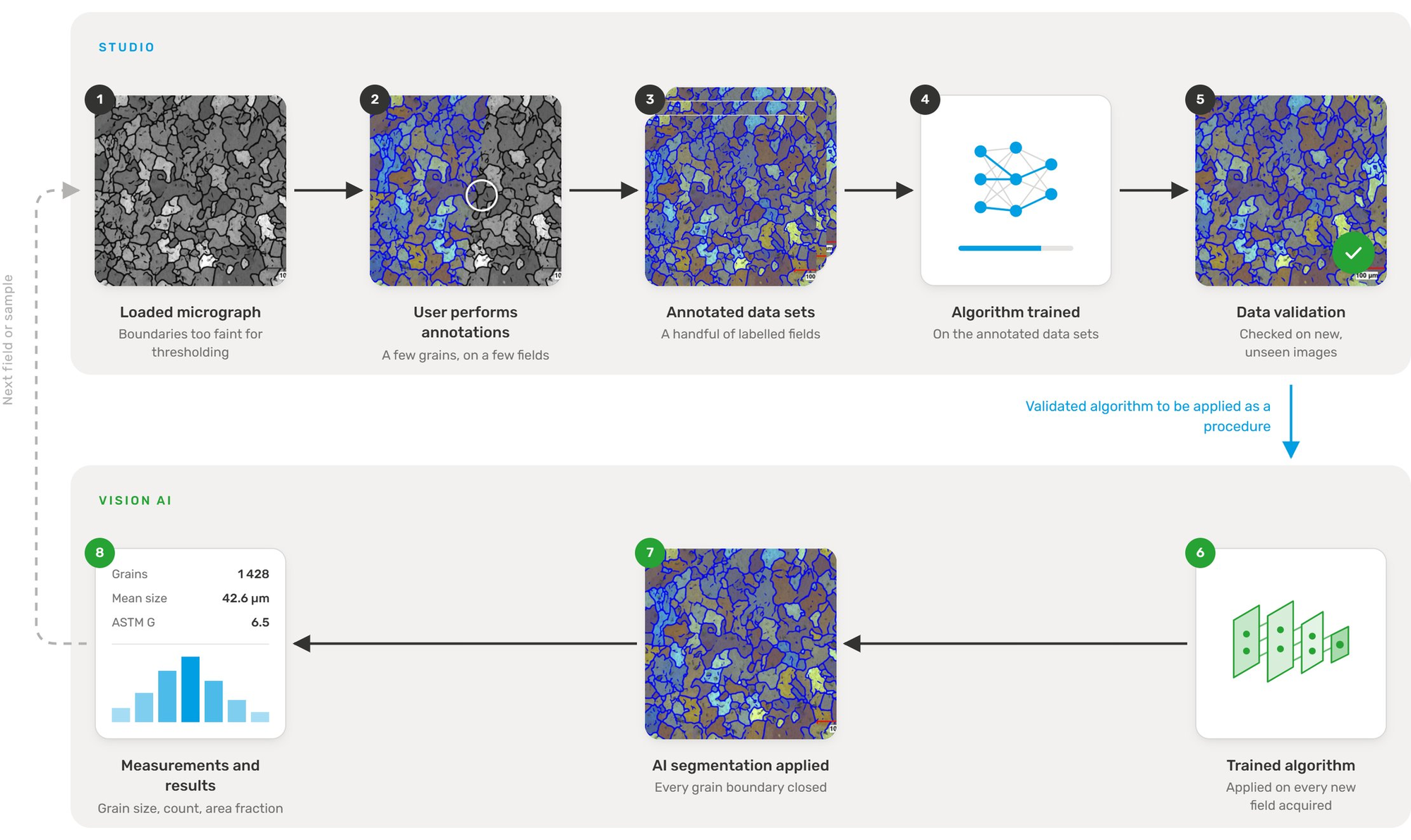
Annotate a few fields once, train and validate the algorithm, then apply it to every new field acquired. Each pass through the loop needs no thresholding and no manual annotation.
AI governance
Regulated and enterprise labs need governance built into the product, not a checklist bolted on later. Clemex Studio gives you data under your control, performance validation in the workflow, and a clear approval path before anything runs in production.
Studio runs on a local PC in your lab, images and models never leave your machine. No internet access is required, making it fully compatible with air-gapped environments.
The Validate step makes it simple to visually compare your annotations against the algorithm's output, side by side, on images the model has never seen, so you can confirm it generalizes before deployment.
Methods follow a Develop → Approve → Deploy cycle before reaching production. Any subsequent change to a deployed method is tracked in the audit trail for 21 CFR Part 11 compliance.
Iteration is fast, but knowing when you're done requires more than looking at overlays. Studio gives you the numbers to make that call confidently.
You do not always start from a blank model. Clemex Studio includes pretrained algorithms that give your lab a stronger starting point than generic AI models: they are designed for microscopy images, common preparation artefacts, and the measurements your lab needs for production analysis.
What can take days or weeks from a blank model often takes hours with a pretrained algorithm.
A detection method built in Studio feeds the measurements your lab already reports. Browse where Clemex image analysis is used, by industry or by the measurement you need.
Grain size, porosity, inclusions, nodularity and phase area in steel, cast iron, aluminum, titanium and powders.
Learn more →Quantitative metallography, contaminant analysis and hardness testing on vehicle components.
Learn more →Microstructure and coating analysis for aerospace-grade alloys under strict qualification requirements.
Learn more →Particle sizing, solder quality control and cleanliness for components and PCB manufacturing.
Learn more →Particle size, shape and distribution for powders, excipients and formulation quality control.
Learn more →Flexible routines for research labs — grain size, phases, particle characterization, custom measurements.
Learn more →Automated grain size to ASTM E112 and E1382, reproducible and audit-ready.
Learn more →Coating and layer thickness on metals, alloys and carbides, per ASTM B487.
Learn more →Phase area percentages in duplex alloys, dual-phase steels, ceramics and composites.
Learn more →Size and shape distributions for metal powders, pharmaceutical and industrial particles.
Learn more →Dendritic arm spacing (DAS/SDAS) in cast aluminum, copper and other alloys.
Learn more →Particle counting and classification per ISO 16232 and IEST-CC1246D.
Learn more →Studio is built for the way microscopy labs actually work, specialists, reviewers, and operators sharing methods and findings across projects.
Managing your first microscopy AI project can feel uncertain—which images to annotate, how much training is enough, how to validate before production, and when the method is ready for release. Clemex services use the same Studio workflow we ship: you are never on a separate consulting toolchain. Engage us for a little guidance or a fully managed turnkey AI project, delivered as a method your lab can run, validate, and adapt.
Hands-on guidance on how to run an AI project in Studio—scoping the application, building a representative image set, planning annotation, validation, and release into production.
Clemex can annotate representative images when your specialists are bandwidth-limited, using the same Studio tools and definitions your team will maintain in production.
Support for metric validation, out-of-distribution testing, and sign-off documentation—so you can approve an algorithm on the quantities your lab actually reports, not mask appearance alone.
Software development to extend Studio with custom features, integrations, or workflow tooling when your environment needs more than the standard product.
Your pace, your scope. From an afternoon of coaching on your first model to Clemex owning annotation, training, validation, and delivery—a turnkey AI project you can fine-tune in Studio whenever you are ready.
Talk to us about Studio servicesClemex Studio is an AI segmentation platform built for microscopy. Domain experts — not data scientists — annotate a few representative images, train a model on their own PC, and validate it on the measurements their lab actually reports.
Thresholding assumes your features are separable by gray level, and recipe-based tools ask you to hand-tune filters until they are. Studio learns the features from your annotations instead, which is what makes twins, similar-intensity phases, and difficult etches tractable.
Some labs do, and if you have the people it is a legitimate option. What usually takes the time is not the model — it is annotation tooling, validation you can defend, packaging the method so operators can run it, and maintaining all of it as materials and preparation drift. Studio ships that scaffolding, and you keep your data and results in open formats.
No. Studio is designed for the specialist who knows the microstructure. There is no coding step, and no waiting on a central data-science team to get a detection method built.
General platforms are trained on everyday photographs and expect large labelled datasets. Studio is specialised for microscopy: it starts from few images, and its pretrained algorithms already account for microscopy imaging, common preparation artefacts, and the measurements labs report.
Often 1–10 representative images are enough to start. More complex applications may need additional annotated examples.
This is the question that separates a demo from a production method. In Studio you compare the metric you actually report — grain size, phase fraction, count — computed from your annotations against the algorithm, on images the model never saw in training. The learning curve shows when more annotation has stopped helping. See the governance section for how this fits an approval path.
Studio runs on a local PC in your lab and does not require internet access, which makes it compatible with air-gapped environments. Confirm licensing and update mechanics for your deployment with Clemex; a Clemex-hosted option is separate, with data residency defined by contract.
Your images, annotations, and measurements export at any time in open formats. You do not need Studio in order to reach your own data.
Yes. Studio is highly effective with various imaging sources, including Scanning Electron Microscopes (SEM). It has been successfully used for complex tasks like analyzing pollen or cross-sectioned cathodes from lithium-ion batteries.
Electronic records, audit trails, and e-signature on production results are typically positioned on Clemex Vision for regulated workflows; Studio is where the algorithm is developed and validated beforehand. Ask Clemex for the current compliance scope for your deployment before making regulatory claims in a validation file.
Request assistance from inside the product and Clemex specialists respond. Services range from coaching on your first model to Clemex running annotation, training, and validation as a turnkey project — all on the same Studio workflow your team owns afterwards.
Start a trial on your own images, or talk to Clemex about licensing, services, and how Studio fits your production workflow.
Help us make clemex.com better. We use cookies to understand how the site is used so we can improve it for you, they're optional, and you can decline. See our Privacy Policy.